
Linux Command
# mysqladmin -u root -pcurrentpassword password 'newpassword'
_

Wednesday, September 30, 2009
How to Change MySQL Root Password Using mysqladmin Command?

Tuesday, September 1, 2009
How to determine whether you are running a 32-bit or a 64-bit edition of Windows
If you are not sure which version of Windows that you are running or whether it is a 32-bit version or 64-bit version, open System Information (Msinfo32.exe), and review the value that is listed for System Type. To do this, follow these steps:
- Click Start, and then click Run, or click Start Search.
- Type msinfo32.exe and then press ENTER.
- In System Information, review the value for System Type.
- For 32-bit editions of Windows, the System Type value is x86-based PC.
- For 64-bit editions of Windows, the System Type value is x64-based PC.
How to determine whether you are running a 32-bit or a 64-bit edition of Windows
If you are not sure which version of Windows that you are running or whether it is a 32-bit version or 64-bit version, open System Information (Msinfo32.exe), and review the value that is listed for System Type. To do this, follow these steps:
- Click Start, and then click Run, or click Start Search.
- Type msinfo32.exe and then press ENTER.
- In System Information, review the value for System Type.
- For 32-bit editions of Windows, the System Type value is x86-based PC.
- For 64-bit editions of Windows, the System Type value is x64-based PC.
Thursday, July 30, 2009
IIS Request Viewer showing Win32 error: -2147024735
IIS Request Viewer showing error :
OpenTraceLogFile () failed (Win32 error: -2147024735 - designated path invalid.)
Solution as follows....
Go to "my computer" properties
>> Advanced tab
>> Click "Environment Variables"
>> Edit Temp variable as c:\temp
>> Apply settings
The IIS Diagnostics Toolkit is a compiled set of tools aimed at reducing the overall time to resolve problems with Internet Information Services (IIS) products.
Download : IIS Diagnostics Toolkit for 32-bit systems
Tuesday, March 24, 2009
How to to disable the DNS cache of Mozilla Firefox
Open Firefox browser :
Type in about:config in the address bar.
Right click on the list of Properties, select New > Integer in the Context menu
Enter network.dnsCacheExpiration as the preference name and 0 as the integer value
When disabled, Firefox will use the DNS cache provided by the OS.
Thursday, January 15, 2009
How to configure ( enable-disable ) Windows XP for log on automatically?
You can configure Windows XP to automate the logon process
1. (click Start, then Run to get to the 'Run' box), then in the run box execute this command:
control userpasswords2
2. You will see a check box labeled 'Users must enter a user name and password to use this computer'.
Remove the check from this check box.
3. Click on OK.
4. You'll be prompted to enter the user name and password you wish to automatically log on with, and then click OK.
Friday, September 12, 2008
Remove loading http://runonce.msn.com/runonce2.aspx
How to stop loading http://runonce.msn.com/runonce2.aspx in internet explorer 7 ?
It is because of the pending of registration.
Make following registry editing (Backup registry first)
[HKEY_CURRENT_USER\Software\Microsoft\Internet Explorer\Main]
"RunOnceHasShown"=dword:00000001
"RunOnceComplete"=dword:00000001
Related : Internet Explorer 8 Beta 2 is released
Friday, August 22, 2008
How to remove MSN messenger form windows ?
Some of us just don't like to use this IM program. I myself have looked in the Add/Remove Program panel and can't find any way to remove it there. I found out how to do it with a little research.
Just go to Start->Run and type in
rundll32 setupapi,InstallHinfSection BLC.Remove 128 %SystemRoot%\INF\msmsgs.inf
and hit ENTER
Do a copy and paste to avoid typographical errors.
related post :
Yahoo Multi Messenger
Google Talk Multiple instances
Thursday, August 21, 2008
How to shutdown Windows Faster ?
All versions of Windows have the same problem. It usually takes a little longer to shutdown when you have the Exit Sound enabled.
To disable this :
go to Start->Settings->Control Panel->Sounds and Audio Devices->Sounds.
Scroll down and look for Exit Windows.
Click on it once and then under Sounds,
choose None.
You should see faster shutdown times.
Wednesday, August 20, 2008
How to make XP stop displaying zipped files as folders ?
In XP, zipped folders could be viewed just by opening up the file. If you have a third party zip program that youjavascript:void(0) want to use instead of the built in one by XP, you can stop XP from displaying the zipped files as folders. This may also be useful for those who are on a slow PC and don't want to open zip files using XP's built in zip program.
To disable this in XP, go to Start->Run and type in regsvr32 /u zipfldr.dll. You may just copy and paste the command into the Run menu. If you want to undo it, just type in regsvr32 zipfldr.dll. Zip away.
Tuesday, August 19, 2008
How to make XP stop displaying zipped files as folders ?
In XP, zipped folders could be viewed just by opening up the file. If you have a third party zip program that youjavascript:void(0) want to use instead of the built in one by XP, you can stop XP from displaying the zipped files as folders. This may also be useful for those who are on a slow PC and don't want to open zip files using XP's built in zip program.
To disable this in XP, go to Start->Run and type in regsvr32 /u zipfldr.dll. You may just copy and paste the command into the Run menu. If you want to undo it, just type in regsvr32 zipfldr.dll. Zip away.
How to Create a Password Reset Disk ?
Windows XP allows you to create a password reset disk, just in case you forget the password and can't login. This is only for computers that are not on a domain. Those that are on a domain may or may not work the same way.
Go to Start->Control Panel->User Accounts and click on your user name. Under Related Tasks on the left pane, click Prevent a forgotten password. A wizard will show up. Click next and then insert a floppy disk into your floppy drive and choose to save the reset disk on the floppy.
Enter your current password and then click Next and Finish. The floppy will now contain your encrypted password. If you forget your password, you can just use the Password Reset Wizard to create a new one. Just make sure to create another reset disk once you changed your password. So if you forgot your password and changed it to a new one, create another reset disk by repeating the above procedure again.
Sunday, August 17, 2008
How to install VLC skins ?
1. Download skins from VLC website
http://www.videolan.org/vlc/skins.php
File extension fro the skin is .vlt
2, Copy .vlt files to "c:\Program Files\VideoLAN\VLC\skins"
3, switch to "skins2."
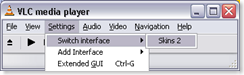
4, right click on the top and " select skin" > select the skin you like
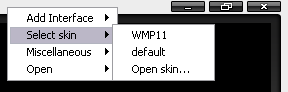
Related Post: Change VLC players skin like a media player 11
Tuesday, July 22, 2008
How Take Screen shots In iPhone and iPod Touch ?
It’s really simple. Just follow the steps below to take screenshots in your iPhone 2.0 or iPod Touch.
1. Open whatever app you want to take the screenshot of in your iPhone or iPod Touch.
2. Now hold the Home button, and tap the Power button on top your phone.
3. Your screen should flash momentarily, and the screenshot should be saved in a new folder under Photos.
.
Monday, June 16, 2008
How to change the Registered Owner Organization in Windows Vista ?
Do the following steps
Click on the Windows Vista Start Button and type in Regedit in the start menu instant search box and hit Enter.
This will opens the Windows registry editor and navigate to HKEY_LOCAL_MACHINE/ SOFTWARE/Microsoft/Windows NT/CurrentVersion.
Modify the registry keys RegisteredOwner and RegisteredOrganization in the right pane of Windows registry editor window.
Reboot your computer and check for the changes.
Monday, March 17, 2008
How to change the Register Owner Organization in Windows XP
By editing registry you can Change this
Open registry editor "regedit"
Go to the path
HKEY_LOCAL_MACHINE\SOFTWARE\Microsoft\Windows NT\CurrentVersion
Modify the values of RegisteredOwner and RegisteredOrganization
Monday, February 18, 2008
You might not have permission to use this network resource error.
do the following to solve this error
1. Click Start, click Run, type regedit in the Open box, and then click OK.
2. Locate and then double-click the following registry subkey:
HKEY_LOCAL_MACHINE\SYSTEM\CurrentControlSet\Contro l\Lsa
3. In the right pane, double-click restrictanonymous.
4. Make sure that the value in the Value data box is set to 0, and then click OK.
5. Close Registry Editor.
6. Restart the computer.
Monday, February 11, 2008
How can I enable / disable the Ctrl Alt Del from logon screen ?
Do the following ...
Start the registry editor (regedit.exe)
Move to HKEY_LOCAL_MACHINE\SOFTWARE\Microsoft\Windows
NT\CurrentVersion\Winlogon
Double click on DisableCAD (create of type REG_DWORD if it does not exist)
Set to 1 if you don't want to have to press Ctrl-Alt-Del, and set to 0 if you do. Click OK
Close the registry editor
Reboot the machine
Tuesday, January 15, 2008
Thursday, January 10, 2008
how to solve error "Outlook Express could not be started because Msoe.dll could not be initialized " ?
Following are the errors
Outlook Express could not be started because Msoe.dll could not be initialized.
Outlook Express could not be started. The application was unable to start the Internet Account Manager. Your computer may be out of memory or your disk may be full. Contact Microsoft support for further assistance. (0x80007114)
Solution
fist find your dbx files and backup that files to a safe location
To work around this issue, use the following methods in the order in which they are presented.
• Rename the Main Identity subkey.
• Back up individual identities subkeys.
• Delete the Identities subkey.
• Re-create you Identities subkeys.
• Re-create e-mail and news accounts.
Rename the "Main Identity" Subkey
Before you back up the Identities subkeys, you must rename the Username value of the Main Identity subkey. To do so:1. Click Start, and then click Run.
2. In the Open box, type regedit.exe, and then click OK.
3. Locate the following registry subkey:
HKEY_CURRENT_USER/Identities
To do so, in the left pane, click the plus sign (+) that is next to each registry key or subkey in the path to expand each branch until you locate the subkey that you want to delete. For example, in the following registry subkey path, the subkey is Identities:
HKEY_CURRENT_USER\Identities
4. In the left pane, click the plus sign (+) that is next to the Identities subkey to expand that branch. Note the globally unique identifier (GUID) subkeys; each is named with a unique ID number, such as the following:
{AFE1AA0D-D202-4C52-AC8D-F68DE06421C1}
5. In the left pane, click each GUID until you find the Username data value Main Identity.
6. In the right pane, double-click Username.
7. In the Edit String dialog box, type Main Backup in the Value data box, and then click OK.
Subscribe to:
Posts (Atom)

