Some of us just don't like to use this IM program. I myself have looked in the Add/Remove Program panel and can't find any way to remove it there. I found out how to do it with a little research.
Just go to Start->Run and type in
rundll32 setupapi,InstallHinfSection BLC.Remove 128 %SystemRoot%\INF\msmsgs.inf
and hit ENTER
Do a copy and paste to avoid typographical errors.
related post :
Yahoo Multi Messenger
Google Talk Multiple instances


Friday, August 22, 2008
How to remove MSN messenger form windows ?

Thursday, August 21, 2008
How to shutdown Windows Faster ?
All versions of Windows have the same problem. It usually takes a little longer to shutdown when you have the Exit Sound enabled.
To disable this :
go to Start->Settings->Control Panel->Sounds and Audio Devices->Sounds.
Scroll down and look for Exit Windows.
Click on it once and then under Sounds,
choose None.
You should see faster shutdown times.
Wednesday, August 20, 2008
How to make XP stop displaying zipped files as folders ?
In XP, zipped folders could be viewed just by opening up the file. If you have a third party zip program that youjavascript:void(0) want to use instead of the built in one by XP, you can stop XP from displaying the zipped files as folders. This may also be useful for those who are on a slow PC and don't want to open zip files using XP's built in zip program.
To disable this in XP, go to Start->Run and type in regsvr32 /u zipfldr.dll. You may just copy and paste the command into the Run menu. If you want to undo it, just type in regsvr32 zipfldr.dll. Zip away.
Tuesday, August 19, 2008
How to make XP stop displaying zipped files as folders ?
In XP, zipped folders could be viewed just by opening up the file. If you have a third party zip program that youjavascript:void(0) want to use instead of the built in one by XP, you can stop XP from displaying the zipped files as folders. This may also be useful for those who are on a slow PC and don't want to open zip files using XP's built in zip program.
To disable this in XP, go to Start->Run and type in regsvr32 /u zipfldr.dll. You may just copy and paste the command into the Run menu. If you want to undo it, just type in regsvr32 zipfldr.dll. Zip away.
How to Create a Password Reset Disk ?
Windows XP allows you to create a password reset disk, just in case you forget the password and can't login. This is only for computers that are not on a domain. Those that are on a domain may or may not work the same way.
Go to Start->Control Panel->User Accounts and click on your user name. Under Related Tasks on the left pane, click Prevent a forgotten password. A wizard will show up. Click next and then insert a floppy disk into your floppy drive and choose to save the reset disk on the floppy.
Enter your current password and then click Next and Finish. The floppy will now contain your encrypted password. If you forget your password, you can just use the Password Reset Wizard to create a new one. Just make sure to create another reset disk once you changed your password. So if you forgot your password and changed it to a new one, create another reset disk by repeating the above procedure again.
Sunday, August 17, 2008
How to install VLC skins ?
1. Download skins from VLC website
http://www.videolan.org/vlc/skins.php
File extension fro the skin is .vlt
2, Copy .vlt files to "c:\Program Files\VideoLAN\VLC\skins"
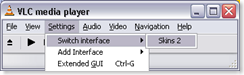
3, switch to "skins2."
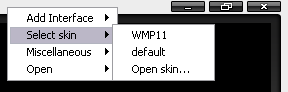
4, right click on the top and " select skin" > select the skin you like
Related Post: Change VLC players skin like a media player 11
Subscribe to:
Posts (Atom)
