TECHNOLOGY UPDATES

Thursday, November 29, 2007

why error - \\computer is not accessible.You might not have permission to use this network resource.contact the administrator ?

Method 1: Enable NetBIOS over TCP/IP and start the Computer Browser serviceTo resolve this issue, make sure that NetBIOS over TCP/IP is turned on and that the Computer Browser service is running on each computer in the workgroup. To do this, follow these steps.
Step 1: Enable NetBIOS over TCP/IP
1. Click Start, click Control Panel, and then click Network and Internet Connections.
2. Click Network Connections.
3. Right-click Local Area Connection, and then click Properties.
4. Click Internet Protocol (TCP/IP), and then click Properties.
5. Click the General tab, and then click Advanced.
6. Click the WINS tab.
7. Under NetBIOS setting, click Enable NetBIOS over TCP/IP, and then click OK two times.
8. Click Close to close the Local Area Connection Properties dialog box.
9. Close the Network Connections window.


Step 2: Start the Computer Browser service


1. Click Start, right-click My Computer, and then click Manage.
2. Double-click Services and Applications.
3. Double-click Services.
4. On the right side, right-click Computer Browser, and then click Start.
5. Close the Computer Management window.

Method 2: Install File and Print Sharing and make sure that it is not blocked by Windows Firewall
Step 1: Install File and Print Sharing for Microsoft Networks
1. Click Start, click Run, type ncpa.cpl, and then click OK.
2. Right-click Local Area Connection, and then click Properties.
3. Click the General tab, and then click Install.
4. Click Service, and then click Add.
5. In the Network Service list, click File and Print Sharing for Microsoft Networks, and then click OK.
6. Click Close.

Step 2: Make sure that File and Printer Sharing is not blocked by Windows Firewall
1. Click Start, click Run, type firewall.cpl, and then click OK.
2. On the General tab, make sure that the Don't allow exceptions check box is not selected.
3. Click the Exceptions tab.
4. On the Exceptions tab, make sure that the File and Printer Sharing check box is selected, and then click OK.

Make sure all computers in the workgroup are configured to use NetBIOS over TCP/IP. Follow these steps:

1. On the desktop, right-click My Network Places, and then click Properties.
2. Right-click the appropriate connection, and then click Properties.
3. Click Internet Protocol (TCP/IP) and click Properties.
4. Click Advanced, and then click WINS.
5. If you are using a static Internet Protocol (IP) address, click Enable NetBIOS over TCP/IP. If you have a DHCP-assigned IP address, click Use NetBIOS setting from the DHCP server.
6. Click OK in the open dialog boxes to close them and to save the new settings.

If this procedure does not resolve the difficulty, force a browser election by restarting all computers in the workgroup.

Warning Serious problems might occur if you modify the registry incorrectly by using Registry Editor or by using another method. These problems might require that you reinstall your operating system. Microsoft cannot guarantee that these problems can be solved. Modify the registry at your own risk.To resolve this issue, set the value of the restrictanonymous registry entry to 0. To do this, follow these

steps:1. Click Start, click Run, type regedit in the Open box, and then click OK.
2. Locate and then double-click the following registry subkey:
HKEY_LOCAL_MACHINE\SYSTEM\CurrentControlSet\Control\Lsa
3. In the right pane, double-click restrictanonymous.
4. Make sure that the value in the Value data box is set to 0, and then click OK.
5. Close Registry Editor.
6. Restart the computer.

Monday, November 26, 2007

Why errors "Orkut is banned you fool " / " I DNT HATE MOZILLA BUT USE IE OR ELSE " ?

It is because of a virus. if it is infected you wont get Orkut, Youtube,

following are the error messages ..

Orkut is banned you fool, The administrators didnt write this program guess who did?? MUHAHAHA!!
I DNT HATE MOZILLA BUT USE IE OR ELSE...
USE INTERNET EXPLORER U DOPE


Removel tool is available @
http://tec-updates.blogspot.com/2007/07/remove-heap41a-win32usbworm-worm.html

Saturday, November 24, 2007

How To Enable HibernationUnder ?

Windows 98, Me, or 2000 there was an option in the shutdown dialog box to enter the computer into hibernation (where all the content of the RAM is copied to the hard disk). The shutdown dialog box of Windows XP doesn't offer any longer the hibernation button. Some users may get confused about how to enable the hibernation mode. If this mode is supported by your motherboard (ACPI) you have to do the following:
1. Click Start and Shut Down,
2. Point the standby button and maintain the shift key pushed,
3. A new hibernation button appears: click it while still holding the shift key: voila your PC will hibernate.

Monday, November 19, 2007

How to Enable ADMIN$ and Registry service permanently ?

Server ADMIN$ Share
For NT4 Servers, Win2K Servers, and Windows Server 2003, go to:
HKEY_LOCAL_MACHINE\SYSTEM\CurrentControlSet\Services\LanManServer\Parameters
Name: AutoShareServer
Data Type: REG_DWORD
Value: 1
Note: A reboot is necessary for this to take effect.

Workstation ADMIN$ Share
For NT4 Workstations, Win2K Professional, XP Professional, go to:
HKEY_LOCAL_MACHINE\SYSTEM\CurrentControlSet\Services\LanManServer\Parameters
Name: AutoShareWks
Data Type: REG_DWORD
Value: 1
Note: A reboot is necessary for this to take effect.
If you want the administrative shares to be re-created, change the value to 1.

For the Remote Registry service
HKEY_LOCAL_MACHINE\SYSTEM\CurrentControlSet\Services\RemoteRegistry
Name: Start
Value: 2
A value of 2 will start the remote registry service automatically.

How to lock folder without any program ?

You can lock any folder without using any software. Follow these steps.

1. Suppose you have a folder named "LEARNER" in D:\LEARNER
2. In the same drive next to the folder create a new notepad file with the exact statement ren LEARNER LEARNER.{21EC2020-3AEA-1069-A2DD-08002B30309D}
3. Now save this text file as loc.bat or any other file with an extension ".bat"
4. Create another notepad file and type ren LEARNER.{21EC2020-3AEA-1069-A2DD-08002B30309D} LEARNER
5. Save this as key.bat or any other file with an extension ".bat"
6. Now there are two batch files. Double click loc.bat and your folder will change into Control Panel and its contents cannot be viewed
7. To open the folder double click key.bat and you get back your original folder .
8. For more safety keep the key.bat in another location .Only for unlocking copy paste to the original location and double click.

Friday, November 16, 2007

How to protect word file with password ?


  1. First open the word file we want to protect with password


  2. Select Save as option


  3. Select “tools” button ( top ) from save window


  4. Then go to “general options”


  5. there you can select password for the document ( see image )


  6. Save the file to store the last changes


  7. The next time when try to open the particular file a dialogue box will come to give password only giving that file will open


Thursday, November 15, 2007

How to take print screen of active window?

Conttent is moved. page will automatically redirect

Wednesday, November 14, 2007

How to bypass windows file protection in windows XP ?

1. Make a backup the SFC_OS.DLL in the C:\WINDOWS\SYSTEM32 directory.
2. Make an additional copy of SFC_OS.DLL called SFC_OS1.DLL and open it in a hex editor.
3. Windows XP (no Service Pack)At offset 0000E2B8 (0E2B8h) you should find the values "8B" and "C6". Windows XP (Service Pack 1)At offset 0000E3BB (0E3BBh) you should find the values "8B" and "C6".
4. Do not continue if you are unable to find these values.
5. Change the values "8B C6" to read "90 90" and save the changes.
6. Run these commands to update the system files:
7. copy c:\windows\system32\sfc_os1.dll c:\windows\system32\sfc_os.dll /y
8. copy c:\windows\system32\sfc_os1.dll c:\windows\system32\dllcache\sfc_os.dll /y
9. If you are prompted to insert the Windows CD, click Cancel.
10. Restart Windows for the change to take effect.

Once these files have been updated apply the registry setting above.

Monday, November 12, 2007

How to capture screen as jpg image without any software ?


• In the required portion press ‘print screen key’
• Take paint software and give paste
• The screen will come to that place
• Save that with a jpg extension at the required location in pc

Thursday, November 8, 2007

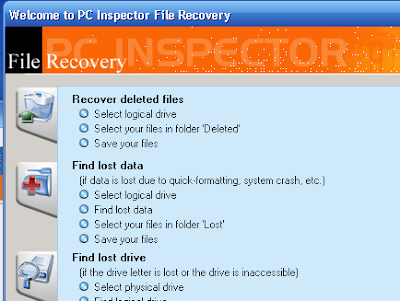
How to retrieve a deleted file ?

You can retrieve your file which you delete from recycle bin. But if you press “shift delete” How you get it back ?

You can use PC Inspector File Recovery to recover your files. But you must have administrative privileges.


Download PC Inspector File Recovery


Also try this two tools


http://www.undelete-plus.com/files/undelete_plus.exe
http://officerecovery.com/download/freeundelete.exe


Please comment here if you recovered your file.

Tuesday, November 6, 2007

How to disable countdown shutdown ?


The warning will state "This shutdown was initiated by NT AUTHORITY\SYSTEM". The message will read Windows must now restart because the Remote Procedure Call (RPC) service terminated unexpectedly.

To stop shutdown go to run and apply “ SHUTDOWN –A ” ( temp )

To stop this countdown message.
Go to run and type “services.msc”


Then select “Remote Procedure Call (RPC)” and take the properties
Go to “recovery” Tab
Select “ Take no Action” instead of “restart the computer”
Apply this In three columns
Then press “Apply” and “OK”
Close services. And restart the PC

Monday, November 5, 2007

Why I canot open taskmanager , regedit , msconfig ?


When you open MSCONFIG, Registry Editor or Task Manager, they flash for a second and quit. This symptom is caused by Viruses. These three are important system utilities which the viruses target.


Download RRT.exe and run to fix this issue ( remember to update your antivirus and remove the virus )


Download

Yahoo messenger 9 beta released


Introducing Yahoo! Messenger 9.0 Beta, the next version of our popular IM software for Windows. This new version has a whole new look and feel, along with some great new features that make it well worth the upgrade. Here’s a quick look at what’s new in Yahoo! Messenger 9.0 Beta:

Following are the new features of yahoo messenger 9....
New Flickr integration , Brand new skins and emoticons!, A whole new look for your contact list, A new in-line media player, New features for voice calls

Download Beta 9 Mac Version Standalone downloader 8.1 Web version